Foundations
Actuality
This article is still relevant because Python developers regularly face the same practical question: should this task use threads, processes, or neither? The confusion usually comes from mixing several ideas together: operating-system scheduling, Python's GIL, I/O-bound work, and CPU-bound work.
The useful question is not "how do I make this concurrent?" but "what is the program waiting on, and what is it actually spending CPU time doing?"
Thesis
In Python, threads are most useful for I/O-bound work, where the program spends much of its time waiting on files, sockets, APIs, or other external resources. Processes are more useful for CPU-bound work, where the program must actively compute. The distinction matters because CPython's Global Interpreter Lock allows only one thread at a time to execute Python bytecode inside a process.
That does not make threads useless. It means they solve a different class of problems than many people first expect.
Core concepts
Three distinctions matter here.
Concurrency versus parallelism. Concurrency means several tasks make progress over overlapping time. Parallelism means several tasks are truly executing at the same moment on different processing units.
I/O-bound versus CPU-bound. I/O-bound tasks spend time waiting for external operations. CPU-bound tasks spend time performing computation.
Threads versus processes. Threads share a process and its memory space. Processes have separate memory spaces and can run Python code on separate CPU cores.
Limits
The usual explanations can become misleading.
- Threads do not automatically make code faster.
- Processes are not free; they add serialization and process-management costs.
- The GIL is not "one thread total"; it is one thread executing Python bytecode at a time per process.
- Real systems often mix I/O-bound and CPU-bound work, so the correct design may use more than one tool.
The goal is not to memorize a slogan, but to match the execution model to the shape of the workload.
Implementation and examples
Processes and threads at the operating-system level
No matter which operating system you use, it already works with processes and threads.
A process is a running program. A thread is a unit of execution inside that process. A process has at least one thread, usually called the main thread, and may have several more.
A simplified way to think about it is this:
- the application is the program stored on disk
- the process is that program while it is running
- the thread is one execution path inside that running process
That simplification is enough for reasoning about Python application code.
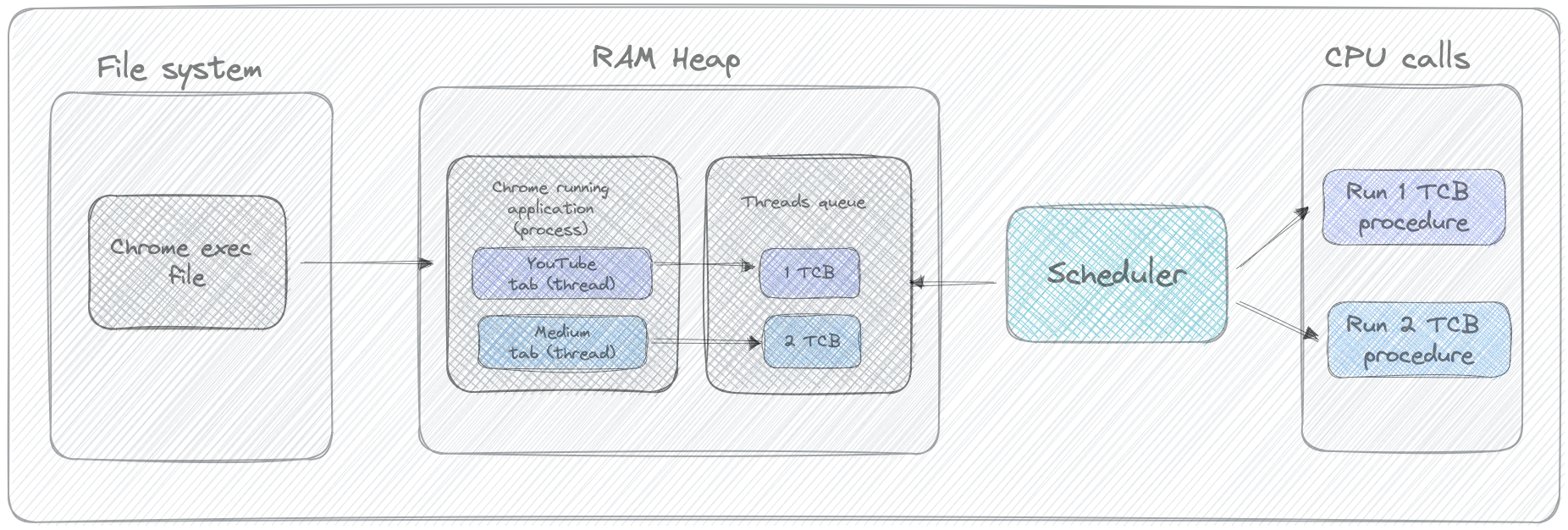
Once a process starts a thread, the operating system schedules that thread for execution. The scheduler decides when runnable threads get CPU time. Python lives inside that larger operating-system model.
What the GIL actually changes
The GIL is often described too casually as if it "turns all threads into one thread." That is not quite right.
In CPython, the GIL is a lock that allows only one thread at a time to execute Python bytecode inside a process.
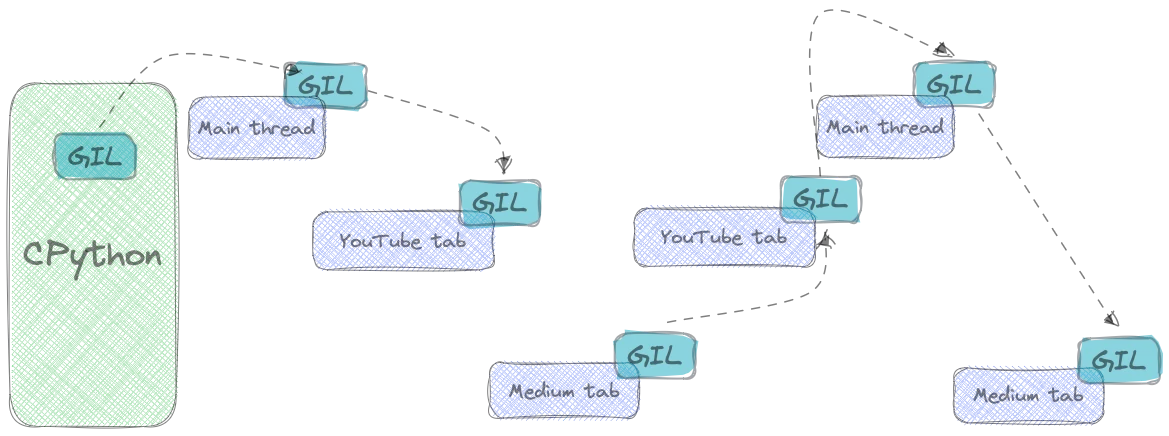
This means:
- several threads can exist inside one Python process
- the operating system can schedule them normally
- but only one of them can run Python bytecode at a time while holding the GIL
Why does that exist? Because threads in a process share memory, and the GIL simplifies safe access to Python objects.
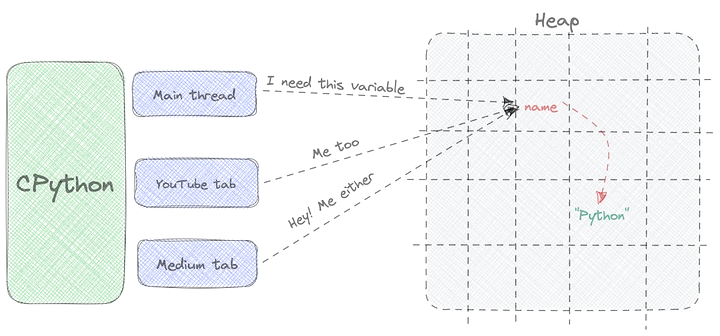
That simplification is valuable, but it also explains why CPU-bound Python threads usually do not deliver the speedup people first hope for.
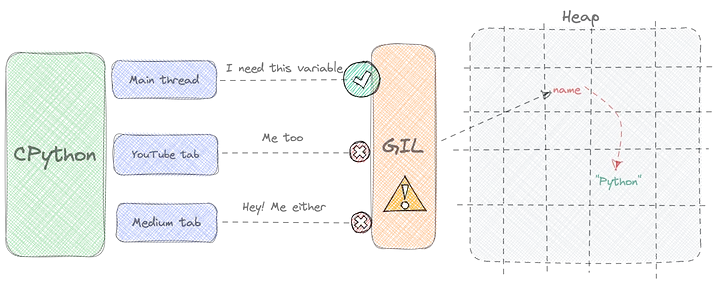
The GIL does not make threads pointless. It makes them best suited to work that spends time waiting rather than continuously computing.
The practical rule: waiting versus working
A useful working rule is simple.
- If the task mostly waits, threads may help.
- If the task mostly computes, processes are usually the better tool.
I/O-bound work
I/O-bound tasks wait for something outside the CPU: network responses, disk reads, database calls, timers, and so on. During that waiting time, another thread can run.
CPU-bound work
CPU-bound tasks spend their time actually executing instructions. If the heavy work is Python bytecode, threads inside one CPython process still compete for the GIL. In that case, another process is usually needed to achieve real parallelism.
The kitchen analogy
The easiest way to see the difference is to treat the CPU like a chef in a kitchen.
Heating food: an I/O-bound task
Suppose the chef needs to heat a potato and a piece of chicken in the microwave. The potato takes 5 minutes and the chicken takes 10 minutes.
The chef does not spend those 15 minutes actively cooking. Most of the time the chef is waiting for the microwave.
That is the shape of an I/O-bound task.

If another item can be started while the first one is waiting, overlapping the waiting time helps.
Preparing a salad: a CPU-bound task
Now suppose the chef must slice vegetables by hand. This is active work. Giving the same chef a second cutting board does not create another chef.
That is the shape of a CPU-bound task.

If the same cook keeps switching between two active tasks, the work does not become truly parallel. It may even become less efficient.

To speed that up, you need another cook. In Python terms, that is closer to adding another process than another thread.
A small code model
You can find the original example code on GitHub.
The examples use a small kitchen model with two operations:
heat(...)simulates an I/O-bound task by sleepingcook(...)simulates a CPU-bound task by doing active computation
# kitchen.py

import time
from dataclasses import dataclass
from enum import Enum, auto


class StrEnum(str, Enum):
    pass


class DishSize(StrEnum):
    S = auto()
    M = auto()
    L = auto()


@dataclass
class Dish:
    name: str
    size: DishSize
    ingredients: list[str]

    def __str__(self) -> str:
        return self.name


def heat(dish: Dish, seconds: int) -> None:
    print(f"Heating {dish}")
    time.sleep(seconds)
    print(f"The {dish} is warm")


def cook(dish: Dish, seconds: int) -> None:
    print(f"Started cooking {dish.name}")

    n = 63_000_000 * seconds
    for _ in range(n):
        pass

    print(f"The {dish} is ready")
The exact loop count is not important. What matters is that one function waits and the other computes.
Sequential execution
A baseline sequential version simply handles each dish one after another.
from time import perf_counter

from kitchen import Dish, DishSize, heat


def main() -> None:
    lunch_for_john = Dish(
        name="John's lunch",
        size=DishSize.M,
        ingredients=["potato", "chicken"],
    )
    lunch_for_mary = Dish(
        name="Mary's lunch",
        size=DishSize.S,
        ingredients=["potato", "chicken"],
    )

    dishes: list[tuple[Dish, int]] = [
        (lunch_for_john, 3),
        (lunch_for_mary, 2),
    ]

    for dish, seconds in dishes:
        heat(dish, seconds)


if __name__ == "__main__":
    start = perf_counter()
    main()
    end = perf_counter()
    print(f"\nTotal execution time: {end - start} seconds")
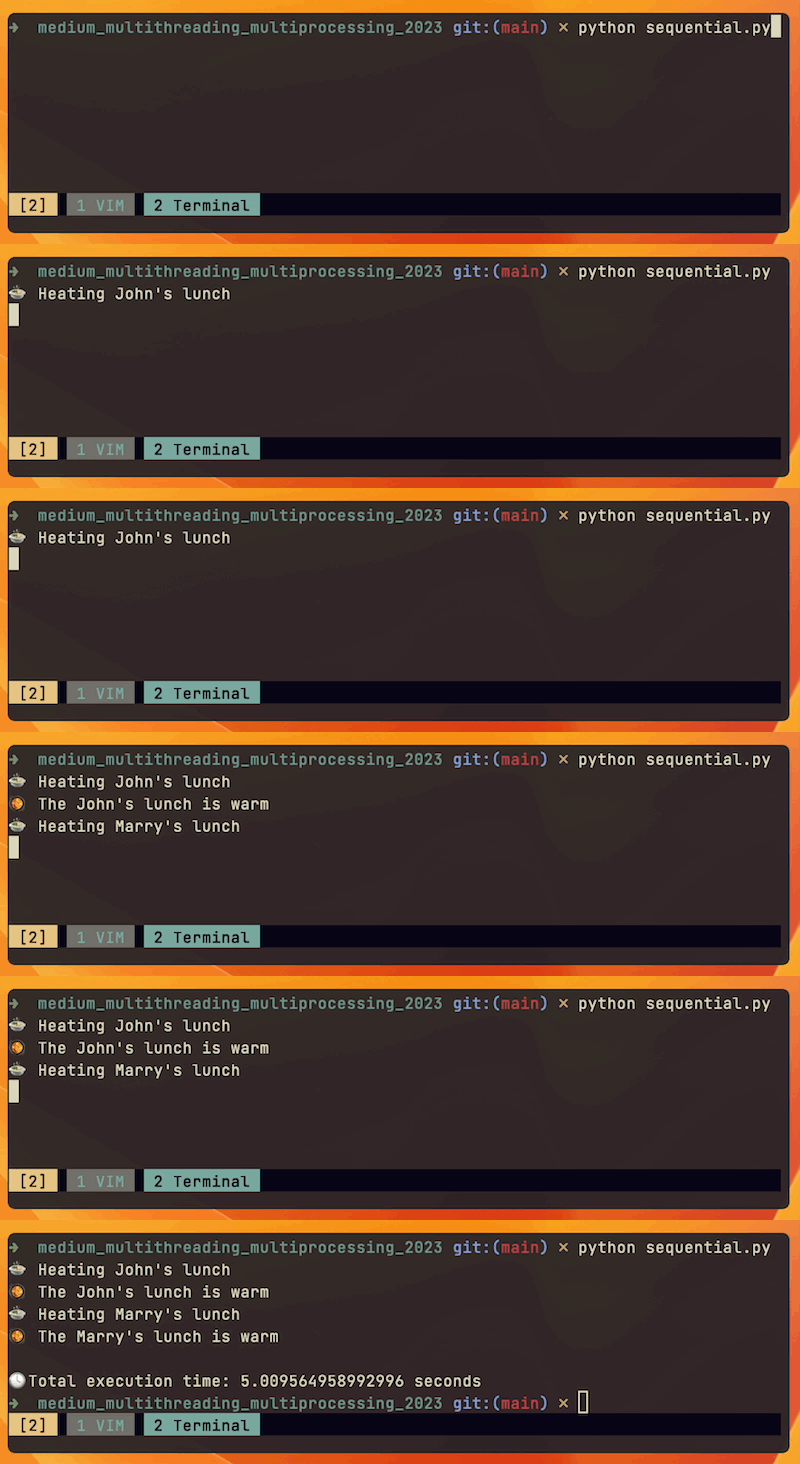
This is simple and predictable, but it cannot overlap waiting time.
Threads for I/O-bound work
Now use threads for the heating case.
from threading import Thread
from time import perf_counter

from kitchen import Dish, DishSize, heat


def main() -> None:
    lunch_for_john = Dish(...)
    lunch_for_mary = Dish(...)

    dishes: list[tuple[Dish, int]] = [
        (lunch_for_john, 3),
        (lunch_for_mary, 2),
    ]

    threads = [Thread(target=heat, args=(dish, seconds)) for dish, seconds in dishes]

    for thread in threads:
        thread.start()

    for thread in threads:
        thread.join()


if __name__ == "__main__":
    start = perf_counter()
    main()
    end = perf_counter()
    print(f"\nTotal execution time: {end - start} seconds")
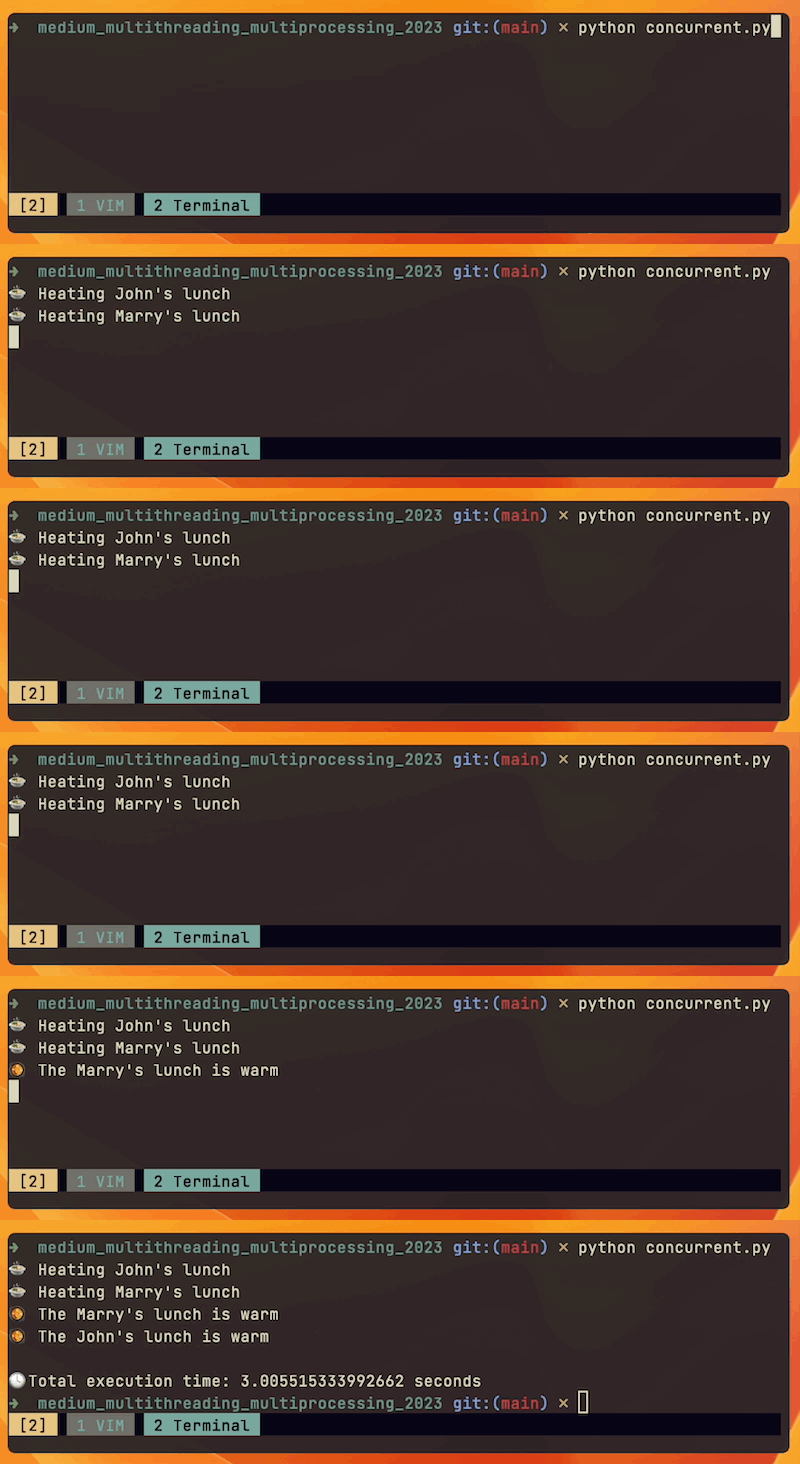
This helps because the program overlaps time spent waiting. That is exactly where Python threads shine.
Threads do not solve CPU-bound work
If you replace heat(...) with cook(...), the result changes.
threads = [Thread(target=cook, args=(dish, seconds)) for dish, seconds in dishes]
Now the tasks are CPU-bound. The threads still exist, but they do not turn Python bytecode execution into real parallel computation inside one process. The GIL becomes relevant, and the speedup largely disappears.
This is the point where many first encounters with Python threading become confusing. The tool did not fail; it was applied to the wrong kind of work.
Processes for CPU-bound work
For CPU-bound work, separate processes are usually the correct direction.
from multiprocessing import Process

from kitchen import Dish, DishSize, cook


def main() -> None:
    lunch_for_john = Dish(...)
    lunch_for_mary = Dish(...)

    dishes: list[tuple[Dish, int]] = [
        (lunch_for_john, 3),
        (lunch_for_mary, 2),
    ]

    processes = [Process(target=cook, args=(dish, seconds)) for dish, seconds in dishes]

    for process in processes:
        process.start()

    for process in processes:
        process.join()
With processes, each worker has its own Python interpreter and its own GIL. That is what allows CPU-bound Python work to use multiple cores more effectively.
Concurrency and parallelism, stated directly
At this point the distinction becomes clearer.
Concurrency means tasks overlap in progress. Threads are a common way to express this in Python, especially for I/O-bound programs.
Parallelism means tasks execute at the same time on separate processors or cores. Processes are the more common path to this in CPU-bound Python code.
In everyday application work, that often reduces to a plain rule:
- use threads to overlap waiting
- use processes to spread active computation
Summary
Python concurrency becomes much easier once the question is framed correctly. Threads are not a general speed-up button. They are a strong fit for I/O-bound work. Processes are the better answer when the program is CPU-bound and needs real parallel execution.
The GIL is the reason that distinction matters so much in CPython. It does not prevent concurrency. It changes which kind of concurrency is useful.
Recommendations
- start by classifying the workload as I/O-bound or CPU-bound
- use threads when tasks mostly wait on external resources
- use processes when tasks mostly compute in Python
- do not assume concurrency automatically means speedup
- choose the simplest execution model that matches the workload
In Python, the most important concurrency decision is often not "how many workers?" but "what are those workers actually waiting on?"